
Screenshot app for Mac
Say it with a screenshot.
Capture any part of your screen, mark it up and drop it into any app — in seconds.
Free for 14 days · macOS 14 or later




Get the highlights.
Watch the filmGive it a beautiful background.
Gradients, padding, rounded corners and a soft shadow — ready to share.

The Snapix editor on a violet wallpaper: a photo of a red fox set on the Obsidian gradient, with padding, rounded corners and a soft shadow, and the Background panel open beside it.
Lift the text off anything.
Press ⌘⇧2 and the words on screen are on your clipboard.

A paused video of an iced drink on a café table, a Snapix selection dragged over its subtitle, “Espresso, a spoonful of cocoa, then cold milk over ice.”, and a banner that says Text copied with the same words.
Blur what’s private.
One drag pixelates a whole column of emails before you share.


A customer table open in the dark Snapix editor: one drag has pixelated the whole Email column, another the Phone column, and the customers’ names are blurred.
Find it again in seconds.
⌘⇧S brings back your recent captures — search even reads the words inside them.

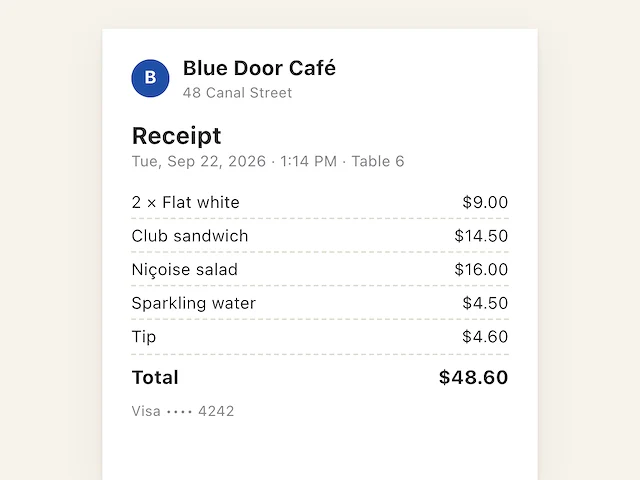


An email to accounts on a Mac with a desert wallpaper. Snapix Recent Captures was searched for the word receipt, which it found inside two screenshots, and the café receipt has been dragged from it into the email.
Capture
Six ways to capture.
One press each.
Snapix answers to ⌘⇧3, ⌘⇧4 and ⌘⇧5 — the shortcuts your fingers already know — and every one of them is yours to change.
-
Area
⌘⇧4Drag across anything. Tap Space to switch to a window.
-
Full Screen
⌘⇧3Every pixel on the display, in one press.
-
Window
⌘⇧5Click a window. Rounded corners and shadow included.
-
Self-Timer
⌘⇧8A countdown to open that menu or hover that tooltip.
-
Extract Text
⌘⇧2Drag over words. Get text, not a picture.
-
Last Area
⌘⇧6The same region again. Perfect for before‑and‑after.


Annotate
Mark it up.
Make it obvious.
Arrows that bend, boxes, numbered steps, text callouts, emoji stickers and a highlighter that snaps to lines of text — plus blur and pixelate for anything sensitive. Everything exports at full Retina resolution.


Click a tool to try it on the photo.Tap a tool to try it on the photo.
Extract Text
Copy text from
anything you can see.
Press ⌘⇧2 and drag across a photo, a video frame, a PDF that won’t let you select, or an error message. The words land on your clipboard as text — recognized on your Mac, which detects the language for you.

-
Find words inside a screenshot
⌘F in the editor marks every match in the picture.
-
On-device, always
Recognition runs on Apple’s Vision framework, even offline.
Recent Captures
That screenshot from
an hour ago? Right here.
Press ⌘⇧S and your recent captures slide up, newest first. Search even reads the words inside them — type “budget” and every capture that mentions it lights up.


-
Keyboard-first
Arrow keys to move, hold Space to preview, Return to copy.
-
Lists that keep
Drag a capture onto a list to keep it for good.
-
Undo a close
⌃⌥Z reopens the capture you just closed.
And so much more.
-
Pin it. Keep it in view.
Float any screenshot above every window.
-
A preview that waits for you.
Copy, save or drag it out.
-
Pick any color.
⌃⌥C copies any pixel’s hex.
-
Set a timer.
⌘⇧8 waits, so you can open a menu first.
-
One click away.
Every capture, from your menu bar.
-
Your shortcuts. Your files.
Choose your keys and file format.
-
Say it with emoji.
Press ⌃⌘Space for 1,870 stickers.


Questions? Answers.
What exactly is Snapix?
Snapix is a screenshot app for Mac that lives in your menu bar. It replaces the basic built-in screenshot tool with six capture modes (area, window, full screen, repeat last area, self-timer, and text extraction), a 16-tool annotation editor, blur and pixelate for redacting, on-device text extraction (OCR), screenshots you can pin on top of every window, and a searchable history of your recent captures.
How is Snapix different from the built-in macOS screenshot tool?
The built-in tool saves a file to your Desktop and offers basic markup. Snapix puts every capture straight on your clipboard, then adds 16 annotation tools (arrows that bend, shapes, text callouts, auto-numbered steps, emoji stickers, a highlighter that snaps to lines of text), blur and pixelate for sensitive data, one-key on-device OCR, pinned floating screenshots, capture history, and fully customizable global hotkeys — all from your menu bar, on the same shortcuts you already press.
How does the free trial work?
Download Snapix and sign in with Apple or Google, and your 14-day free trial starts — no credit card. You get full access to every feature. When the trial ends, keep Snapix Pro for $2.49/month billed annually, $3.49 monthly, or $79 once.
Is Snapix really private?
Yes. Every capture, annotation, and OCR result is processed on your Mac. Snapix takes one-shot screenshots only — there is no screen recording and no background capture, and the screen recording permission macOS asks for is used solely at the moment you capture. Your capture history stays on your Mac, encrypted on disk.
Is Snapix a good CleanShot X alternative?
Yes — Snapix covers the same core workflow: instant capture, a floating preview, a full annotation editor, on-device OCR, and pinned screenshots. It has no cloud product built in, and it costs $29.88/year with a 14-day free trial.
For everyone who has to
explain things.
-

Developers, filing the bug
-

Support, walking someone through
-

Teams, reviewing the work
-

Freelancers, sending the update